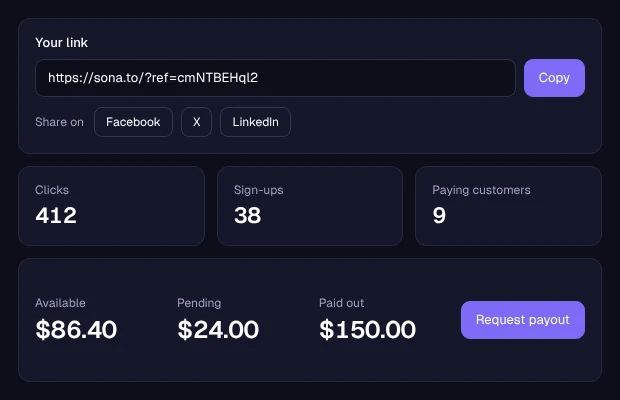
Your link is on the Affiliate page of your dashboard as soon as you create an account. Share it on social media, in a newsletter, on your website or by email. When someone signs up through it and pays for a plan or AI credits, 20% of that payment becomes your commission.
Your link, your clicks and your balance
The Affiliate page shows your link, how many people clicked it, signed up and became paying customers, and how much is pending, available and paid out.
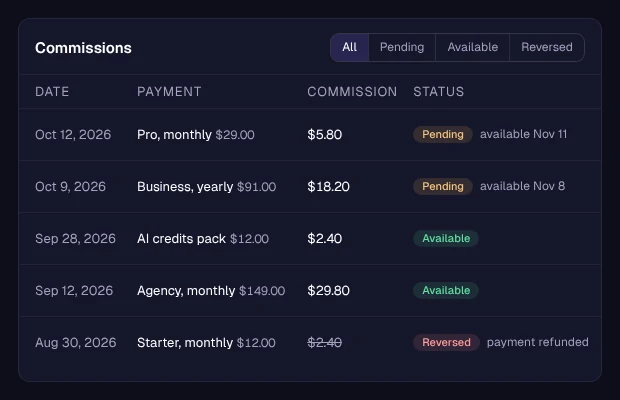
Each commission, with its status
Every commission adds a line with the payment it came from. It stays in Pending for 30 days, then moves to your available balance.
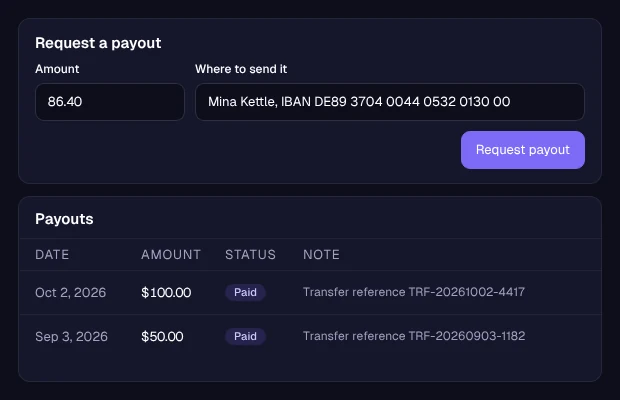
Your payouts
Once your available balance reaches $50, request a payout and say where to send it. We send it by hand, pay the transfer fee and add the reference next to the payout. Payout method: Bank transfer.
How it works
1
Create a free account
Your referral link is ready on the Affiliate page.
2
Share your link
If the person signs up within 30 days of their visit, the account is credited to you.
3
Earn on their payments
20% of each payment is yours. It is pending for 30 days, then available.
4
Request a payout
Available from $50. Payout method: Bank transfer.
Questions
20% of every payment made by the accounts that signed up through your link, plans and AI credits included, for as long as they keep paying.
30 days. If the person creates an account within 30 days of visiting through your link, the account is credited to you.
A commission is pending for 30 days after the payment. After that it is added to your available balance.
Request a payout from your dashboard once your available balance reaches $50. We pay the transfer fee. Payout method: Bank transfer.
The commission for that payment is reversed. If it was already available, it comes out of your balance, and any amount left to recover comes out of your next commissions.
No. Every account has a referral link, free ones included. Inviting people by email from the dashboard needs an account that has made a payment.